Watch or listen to the five percent
that matters.
Drop in a YouTube link or a podcast RSS feed. Tell us what you want to learn, or ask a specific question. We surface the moments worth your attention and stitch them together with editorial transitions, not robotic skips.
A 17-minute TED talk becomes
the four that matter.
Press play. We'll walk through a real video end-to-end - paste, pick, watch - in under thirty seconds.
Drop in a link · YouTube or a podcast RSS feed
Pasting…
Other tools give you a summary.
We give you the scenes.
- Returns a wall of text - you still don't know what the speaker actually said
- Auto-picks what's important based on word frequency, not on what you care about
- Can't answer a specific question, just paraphrases the whole thing
- Loses the speaker's voice, examples, and demonstrations
- Returns the actual video or audio, only the 2 to 5 minutes that earn your time
- Pick the topics or ask a specific question. The cut is built around exactly that
- You hear it from the source: examples, demos, and the speaker's intent intact
- Optimized for understanding. Tight on time, complete on meaning
Four ideas, applied consistently.
You set the direction
We extract topics from the transcript and let you pick. Or type your own question, like "What does the speaker say about X?", and the cut will surface the exact moments that answer it. The model never decides what matters; you do.
Editorial transitions
Between clips, a single line bridges the conceptual jump. It feels like a director's cut, not a robot skipping forward.
Boundary discipline
Cuts start where the speaker actually starts explaining, not on filler. They end when the point lands, not thirty seconds of trailing throat-clearing later.
Transcript-only
For YouTube we read the captions; for podcasts we run audio through Whisper and discard it. We never host or store the source media. Your watch and listen history stays where it belongs.
Four steps, one minute of setup.
Paste a link
Any YouTube video with captions, or a podcast RSS feed. Long-form interviews, lectures, talks, deep-dive tutorials, conference recordings: the longer the source, the better the math works.
Pick your topics, or ask your own question
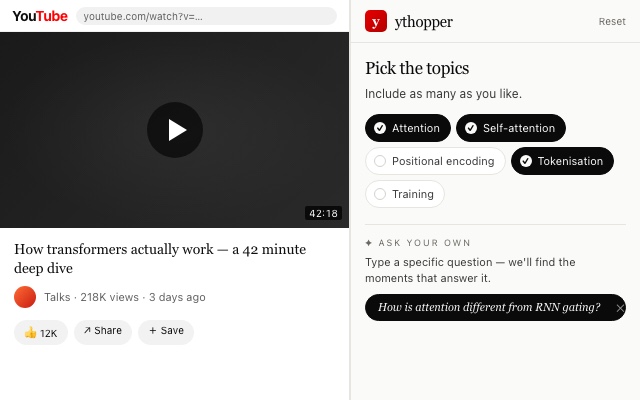
We read the transcript and propose six to ten learning angles. Pick the ones you care about, or type a specific question like "How does the speaker define attention?" and the cut will find the moments that answer it.
Review the cut
Five to twelve segments arrive with titles, timestamps, and a one-line reason each was chosen. Drop the ones you don't want.
Watch or listen to the reel
Auto-advance through the selected clips. A four-second editorial bridge connects each transition. End-to-end, often under twenty minutes.
Even simpler:
never leave YouTube.
Install the ythopper Chrome extension and the whole flow lives in a side panel right on the YouTube page. Open a video, click the icon, pick your topics, and the reel opens in a new tab. Podcasts run through the web app - paste the RSS feed at the top of this page.
- Works on any youtube.com watch page
- Signs in with your existing ythopper account
- In-progress reels resume when you return to the video
Free. Same weekly limits as your account.
“A three-hour lecture became
twenty-two focused minutes
of exactly what I came for.”
Free is generous.
Pro is generous-er.
Most days the free plan is plenty. When the queue piles up, Pro gives you 10× the weekly cuts for the price of one coffee.
- 5 reels per rolling week
- Every reel saved to your library
- Editorial cuts, context bridges, transcripts
- 50 reels per rolling week (10× free)
- Built for daily reading habits
- Everything in Free, no caps that matter
- Priority response on issues
Try it with the next video or episode
on your list.
No account. No download. Just the moments that matter.
Paste a link